How to add testimonials to an Astro site
Updated · 5 min read · By George
Astro sites are your own code, so there's no embed block to hunt for and no plan to upgrade: you paste the testimonials straight into a component. You can keep them in the component as data, or add a testimonial widget that updates itself. This guide covers both, and the two Astro details that trip people up.
Option 1: keep the testimonials in your code
Put the testimonials in an array in the component's frontmatter and loop over them. For more than a handful, move them into a JSON file or a content collection and import them instead.
---
// src/components/Testimonials.astro
const testimonials = [
  { quote: "Bookings doubled in the first month.", name: "Priya N.", role: "Studio owner" },
  { quote: "Clear, quick and easy to work with.", name: "Tom R.", role: "Café owner" },
];
---
<section class="testimonials">
  {testimonials.map((t) => (
    <figure>
      <blockquote>{t.quote}</blockquote>
      <figcaption>{t.name}, {t.role}</figcaption>
    </figure>
  ))}
</section>It's fast and fully under your control, but every new testimonial means editing the file, rebuilding and redeploying. You also need to keep your own record that each customer agreed to be quoted.
Option 2: a testimonial widget in a component
A testimonial widget is a two-line snippet from a testimonial tool. Add it once, and new testimonials appear as you approve them, with no rebuild or redeploy. Wrapped in a component, it looks like this:
---
// src/components/Testimonials.astro
---
<section>
  <h2>What clients say</h2>
  <script async src="https://trytestimonials.com/widget.js"></script>
  <div class="tc-wall" data-wall="your-wall-code"></div>
</section>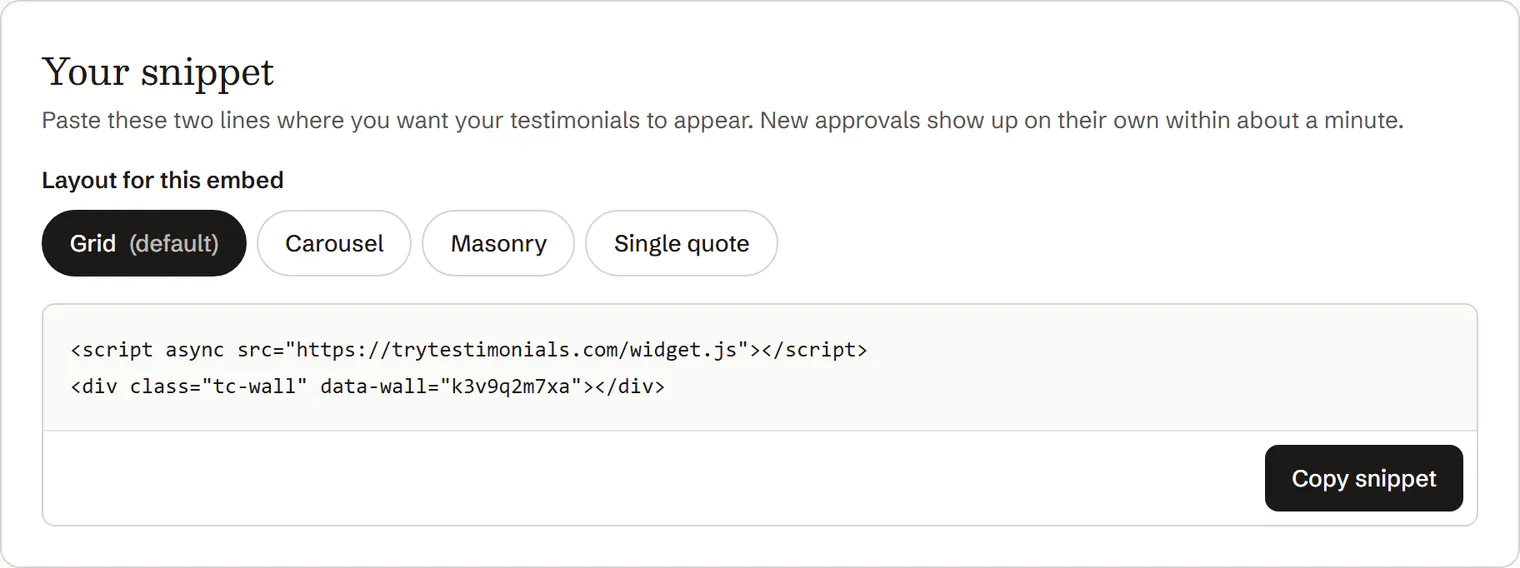
Copy the snippet from your testimonial tool.
Create src/components/Testimonials.astro and paste the snippet inside it.
Keep the attributes exactly as they are, including
asyncandclass.Import the component into a page or layout and place it where the testimonials should go.
For example,
import Testimonials from "../components/Testimonials.astro";at the top ofsrc/pages/index.astro, then<Testimonials />below your hero.Check it with astro dev, then deploy.
The widget loads its testimonials in the browser, so it shows in development as well as on the live site.
If it doesn't appear
- The script tag was changed. Without
asyncoris:inline, Astro tries to bundle the script instead of loading it. Paste the snippet again as it was. - It's inside a React, Vue or Svelte component. Put the snippet in a
.astrocomponent instead. Framework components treat<script>tags differently, and React wantsclassNamerather thanclass. - It's in a Markdown or MDX page. Put the snippet in a
.astrocomponent and use that component from your layout, or import it into the MDX file. - A content security policy blocks it. If your site sets one, allow scripts and connections from your testimonial tool's domain.
Where to place them
Below your hero, on service and pricing pages, and just above your main call to action. Because it's a component, you can drop the same testimonials into several pages and change them in one place.
To gather more, read How to ask customers for testimonials, and copy a message from these request templates.
Questions
Does the widget work with Astro's view transitions?
It should. The widget watches the page for testimonial walls added after it loads, so walls on pages you navigate to are filled in too. If you use view transitions, check a page you reach by clicking a link as well as one you load directly.
Does it work on a fully static Astro site?
Yes. Nothing happens at build time: the testimonials load in the visitor's browser, so a static build on Netlify, Vercel, Cloudflare Pages or GitHub Pages shows new ones without a rebuild.
Will it slow my Astro site down?
The script loads with async, so it never blocks your page. Pick a widget that adds no web fonts, images or cookies, and Astro's fast page loads stay intact.